


CYBEX
3.626.00 Reviews
App Specs
- Version
- 3.0.3 (2026.08.10.11.12)
- Updated On
- License
- Free
- Downloads
- 50,000+
- Developer
- CYBEX GmbH
- Categories
- Parenting
- Platform
- Android
Screenshots

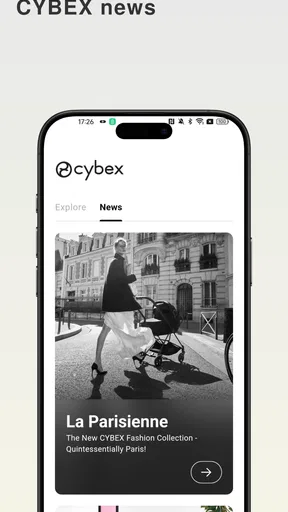
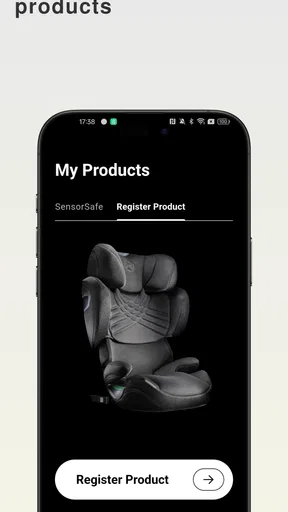
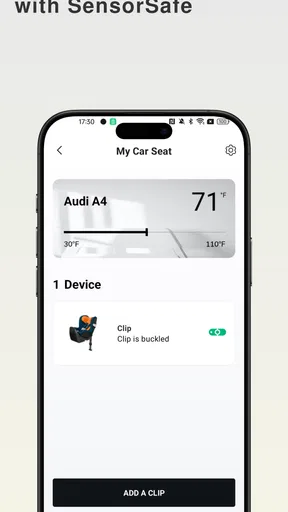
 Analysis by AppCompare
When I first opened CYBEX, I approached it less like a general parenting app and more like a companion for people already using products from CYBEX GmbH. That distinction matters. The app is free, available to everyone from an age-rating perspective, and runs on Android devices using version 8.0 or later, but its usefulness depends heavily on whether CYBEX already has a place in your family’s daily routine.
My overall impression is that this is a brand-focused parenting tool rather than a universal family organizer. It can make product ownership more convenient, especially when I want information connected to a CYBEX item in one place. At the same time, I would not install it expecting a complete replacement for a calendar, baby tracker, shopping list, or broad parenting resource. Its strongest value comes from reducing the small bits of friction that appear after buying and using CYBEX equipment.
How I would decide whether the CYBEX app belongs on my phone
I’d judge its first-week appeal by one practical question: does it make a CYBEX product easier to manage, or does it simply add another place to check? I’d try it with an item I use often, then see whether finding and sharing relevant information feels more straightforward. That short trial gives me a useful baseline for deciding whether the app can become part of a lasting routine.
The first question is whether you own CYBEX products
The most important decision criterion is simple: do you use, or plan to use, a CYBEX product? If the answer is yes, the app makes more sense because it is designed as an application for CYBEX consumers. I would treat it as a digital extension of the ownership experience, not as a standalone parenting platform that offers equal value to every family.
For a parent who is comparing products, organizing information after a purchase, or trying to keep brand-related details easy to find, a dedicated app can be more practical than searching through browser tabs, printed manuals, email receipts, and general search results. The benefit is not dramatic every minute of the day. It appears in those occasional moments when I need the right information quickly and do not want to remember exactly where I saved it.
If you do not own anything from the brand and are simply looking for feeding logs, sleep tracking, developmental activities, or a shared family calendar, I would start elsewhere. Installing this app first would add another account or destination without solving the main problem. That is the first trade-off: its focus can be helpful for CYBEX households, but narrow for everyone else.
What I would look for during the first session
My first practical test would be whether the app helps me connect my everyday parenting needs with the CYBEX products I actually use. I would check how quickly I can find relevant product information, whether the layout feels understandable on a phone, and whether I can return to useful sections without repeatedly starting from the beginning.
Worth Reading Before You Choose

EA SPORTS FC Mobile 26 Is a Bigger Football Game, but It Takes Time

Flipboard Shows What News Apps Must Do Beyond the Feed

Switching to Android Auto Means Rethinking Your Driving Routine

Google Calendar Makes a Crowded Week Easier to Manage

Ludo King Makes the Most of the Minutes Between Plans

Baby Panda World Brings Quick Play to Modern Phones, but Its Game Library Feels Busy
This is also where expectations should stay realistic. The store summary presents it as an app for CYBEX consumers, while the short description is simply “CYBEX.” That tells me the product is intentionally broad within the brand rather than built around one narrowly defined parenting task. I would therefore judge it by convenience, organization, and relevance to CYBEX ownership, not by whether it behaves like a specialist health or child-development tracker.
A good setup habit is to install it before a busy travel day rather than while standing beside a car with a restless child. I prefer to explore the account and product areas at home, when I can identify the exact item I own and notice whether the app’s organization matches the way I think about it. That small preparation can make a branded companion app feel useful instead of becoming one more thing to troubleshoot under pressure.
Why the app’s audience matters more than its download count
The app has passed fifty thousand installs and holds an average rating of 3.6 from around seven hundred ratings. I see those figures as a sign that it has a real user base, but not as a reason to assume it will fit every household. A middling average usually encourages me to pay attention to practical friction: navigation, account setup, product discovery, and how much value remains after the initial visit.
The current release is version 3.0.3, with the displayed build identifier 2026.08.10.11.12. I would keep the app updated when possible, particularly because brand companion apps can change how they organize product information over time. Still, an updated version does not change the central question: whether you want a CYBEX-specific place for your ownership needs.
A realistic family scenario
Imagine a parent preparing for a weekend trip with a child. The car seat, stroller, and travel accessories are already part of the family’s routine, but the parent wants to review product details before leaving. Instead of looking through a drawer for paperwork or searching a long browser history, the app becomes the first place to check. Even if that happens only occasionally, the time saved can feel worthwhile when the rest of the trip is already complicated.
I also see a use case for households where two adults share responsibility. One person may have chosen the product, while the other handles packing, transport, or day-to-day use. A central app can reduce the “ask the other parent where that information is” problem. The advantage is less about advanced parenting analysis and more about making brand-specific knowledge easier to hand over between people.
Another useful habit is to use the app as a reference point rather than relying on memory. Parents often remember the general product name but not the exact variant or the location of every relevant detail. If the app helps keep that relationship clear, it may be more dependable than a vague web search that produces several similar-looking results.
Where CYBEX wins, and where another type of app may fit better
The longer-term choice depends on how often product-specific information comes up in your household and whether the app fits alongside tools you already rely on. I’d keep it if it reduces repeated searching or makes caregiver handovers smoother; if your needs center on schedules or daily child tracking, a general family organizer or specialist tracker may earn that phone space more readily.
The strength of a focused brand companion
In my experience, the clearest advantage is concentration. A general parenting app tries to cover many areas at once, while a brand companion can keep its attention on the products and consumer journey associated with one manufacturer. For CYBEX owners, that focus may feel more relevant than scrolling through unrelated articles, generic checklists, or recommendations for products from other brands.
The app is also free, which removes the financial barrier to trying it. I can install it, explore its usefulness, and decide whether it deserves a permanent place on my phone without committing to a subscription. That matters for parents who already manage several paid services and do not want another recurring expense merely to access basic ownership information.
Its Everyone content rating is another practical advantage for a shared household. I would still expect the parent or account holder to manage the app responsibly, but the rating makes it suitable for a broad audience rather than restricting it to a narrow age group. That fits the reality of family devices, where parents may use one phone while older children occasionally watch or help with product-related tasks.
Three ways I would use it more intelligently
First, I would install it at the point when a CYBEX product enters the household, not months later. Early setup gives me a chance to connect the app with the correct product while the packaging, model name, and purchase context are still easy to identify. Waiting until I urgently need information creates unnecessary uncertainty.
Second, I would make it part of a handover routine. If another caregiver is taking the stroller or car seat, I would show them the relevant area in the app instead of assuming they know where to look. This is a small but non-obvious benefit: the app can support shared ownership, not just individual browsing.
Third, I would avoid treating it as my only parenting tool. I would keep a separate family calendar for appointments, a dedicated tracker if I need feeding or sleep records, and the CYBEX app for CYBEX-specific matters. Separating these jobs prevents disappointment and makes each tool easier to evaluate.
Where general parenting apps are the better choice
If your priority is recording a child’s sleep, meals, medication, growth, or daily routines, a specialist parenting tracker is likely a better match. Those apps are built around repeated entries and trends, while a manufacturer-focused app serves a different purpose. I would not choose CYBEX as my main digital diary for a newborn or toddler.
A family calendar is also more suitable when the main challenge is coordinating adults, school events, appointments, and shared errands. The CYBEX app may complement that system, but it is not the tool I would open first to see everyone’s schedule. Likewise, a broad shopping or registry app may be better for comparing products across brands, because a CYBEX-centered experience naturally favors its own ecosystem.
There is a further limitation for families who own products from several manufacturers. A dedicated app for one brand can divide information rather than unify it. If your stroller, car seat, monitor, and accessories come from different companies, I would use CYBEX for its own products while keeping a simple household note or document for everything else. That approach may be less elegant, but it avoids expecting one brand app to manage an entire mixed collection.
The friction I would expect before committing
The main friction is the possibility of limited value between product-related moments. A general parenting app can give me a reason to return every day because I am logging or checking something. A brand companion may be more occasional. If I rarely need product information, I might keep it installed only when I am actively setting up, traveling, or reviewing an item.
I would also pay attention to how much effort the app requires before becoming useful. Any extra sign-in steps, unclear product matching, or confusing navigation can weaken the benefit of having everything in one place. I would not call those problems definite characteristics of this release, but they are the areas I would test first because they determine whether convenience is real or merely promised.
The rating of 3.6 reinforces my cautious approach. It is not a reason to reject the app, especially when it is free, but it does suggest that I should judge it personally rather than assume a polished experience. I would give it a short trial with the product I use most often and remove it if it does not save time or reduce searching.
What switching actually costs
Moving from scattered product information to a dedicated app is not a difficult change, but it does require a little setup discipline. I would need to remember which email or account I used, identify the correct CYBEX product, and decide whether another caregiver should have access to the same information. Those steps are small, yet they are exactly the kind of tasks parents postpone when the household is busy.
The cost is higher if I try to replace several existing tools at once. I would not transfer my calendar, shopping lists, or child-tracking records into a brand app simply because it is already on my phone. A better approach is gradual: use CYBEX for CYBEX-related information, keep the tools that already handle family coordination well, and reassess after a few weeks.
Because the app is free, the financial cost of trying it is low. The more meaningful cost is attention. Every app competes for storage, notifications, and mental space. I would keep it only if I can name a recurring task it makes easier, such as preparing for travel, sharing product details with another caregiver, or locating information connected to a CYBEX purchase.
Who should install it, and who should skip it
I would recommend trying it to parents who already own CYBEX equipment and want a central, brand-specific companion. It is especially sensible for families who share caregiving duties, move between homes, travel with children, or find printed product information easy to misplace. For those users, the app’s value comes from reducing small interruptions at the moments when product details matter.
I would be more hesitant for someone who is only researching the parenting market and wants an unbiased comparison across manufacturers. The app may still be useful as part of learning about CYBEX, but it should not be the sole basis for a purchase decision. I would compare products independently and use the app as an ownership aid once CYBEX becomes part of the household.
I would also skip it if my main goal is daily child tracking or family scheduling. A specialized tool will probably feel more active and purposeful. Installing CYBEX in that situation could create the impression that it is missing features when the real issue is that I chose the wrong category of app.
My recommendation after weighing the trade-offs
My recommendation is conditional but positive: if you are a CYBEX consumer, the free app is worth trying because its focused role can make product ownership more organized. I would not promise that it will become a daily essential, and I would not replace a calendar or parenting tracker with it. Instead, I would treat it as a practical reference companion that earns its place by saving me from repeated searches.
The best way to evaluate it is to test one complete workflow. Install it, connect the CYBEX product you use most, show the relevant information to another caregiver, and revisit it during a real preparation task such as packing for a trip. If that process feels clearer than your current method, keep it. If it adds another layer without reducing effort, there is no strong reason to force it into your routine.
CYBEX GmbH has positioned this as an app for its consumers, and that positioning is exactly how I would use it. It is not a universal parenting solution, but it does not need to be. For CYBEX households, its strongest promise is simple: keep brand-specific ownership tasks easier to find and easier to share. That focused benefit makes it a sensible optional download, while families looking for broader parenting management should choose a more specialized alternative.
Pros
- Real-time access to CYBEX product information and support resources.
- Useful for checking compatible accessories and replacement parts.
- Clean interface makes browsing product categories straightforward.
- Helps parents stay informed about child-safety product updates.
- Convenient mobile access when shopping or comparing CYBEX products.
Cons
- Some features may depend on your country or selected CYBEX market.
- Product details can vary between regions and may not be fully consistent.
- The app offers limited value if you do not own a CYBEX product.
- Certain support requests may redirect you to external web pages.
- Large product images and media may use considerable mobile data.
FAQs for CYBEX
What is the CYBEX app used for?
The CYBEX app is designed to support parents who use CYBEX products, such as strollers, car seats, and baby carriers. Depending on the product and region, it may provide product information, setup guidance, instructional videos, safety recommendations, warranty or registration features, and access to customer support. Its exact features can vary according to the connected product, country, and app version.
Can I use CYBEX without owning a CYBEX product?
You may be able to download and browse parts of the CYBEX app without owning a CYBEX product, but many of its most useful features are intended for registered customers. Product-specific instructions, manuals, compatibility information, and support tools may require you to select or register a CYBEX item. Before downloading, check whether the app supports your product and country.
Does the CYBEX app connect to CYBEX car seats or strollers through Bluetooth?
Not every CYBEX product connects to the app, and the availability of smart features depends on the model. Some products may offer digital support or connected functions, while others only use the app for manuals, registration, and assistance. If connectivity is important to you, verify your exact product model, required permissions, and regional compatibility in the official app listing.
Is the CYBEX app free to download, and does it require an account?
The CYBEX app is generally available as a free download, although mobile data charges may apply when downloading or using online content. Certain features can require an account, product registration, or personal information such as an email address. Review the app’s current privacy policy and permissions before creating an account, especially if multiple family members will use it.
Is the CYBEX app a replacement for the product manual or professional safety advice?
The app can make CYBEX instructions easier to access, but it should not replace careful reading of the official product manual or professional guidance. Car-seat installation and child-safety decisions require particular attention, and instructions may differ between models and countries. Always follow the manual supplied with your product, check for updated safety notices, and contact CYBEX support when something is unclear.


